Salamandra: configuring a Redragon mouse without the vendor software
Why I wrote an open configurator for my M901-1, how the protocol works, what already runs on three other models and how to help test it.
Versão em português: Salamandra: configurar mouse Redragon sem o software do fabricante.
I own a Redragon M901-1 Perdition 2. The mouse keeps its LED, DPI, buttons and macros in its own memory. To change anything, the only option is the vendor software, and it only runs on Windows.
On macOS and Linux the mouse is stuck with the factory settings. So I wrote Salamandra.
What it is
An open configurator for Windows, Linux and macOS. It sets LED, DPI, polling rate, profiles, buttons and macros straight on the mouse. It does not need the vendor software and the configuration stays stored in the mouse: LED, DPI, buttons and macros work without the app. Only the built-in shortcuts (copy, paste, Alt+Tab) need it running in the background.
The code is at github.com/polotto/salamandra, MIT licensed. It is written in Rust, with a Tauri and Svelte app.
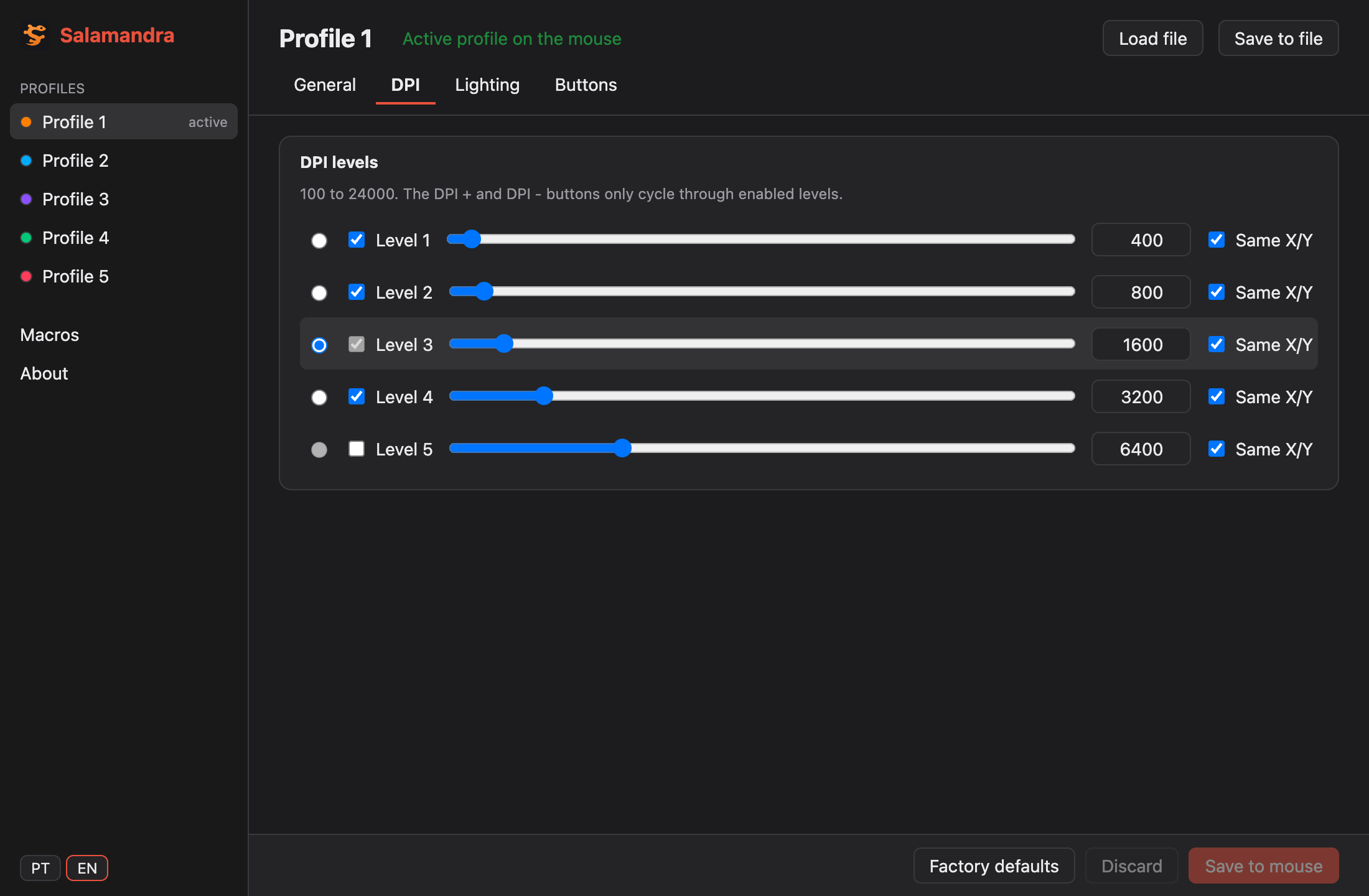
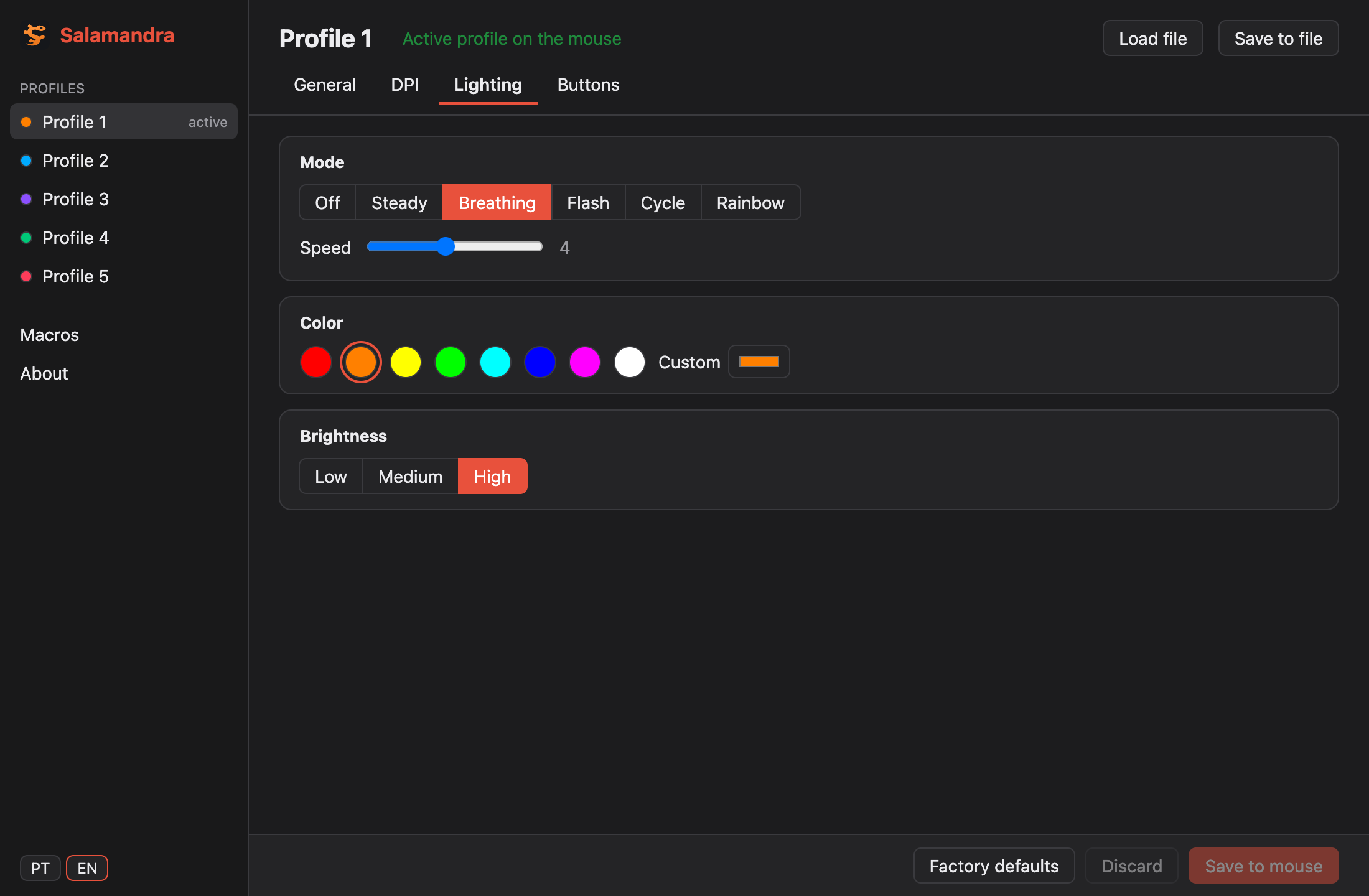
The app screenshots use example data on a simulated mouse.
How I found the protocol
This mouse uses a Holtek chip. The configuration travels in HID feature reports: a command, a memory address, a length and the data. Writing is F3, reading is F2, and the rest only switches profile and confirms the write.
To map the addresses, I read how the official software builds each packet. I did this for interoperability, by decompiling the executable, and only facts went into the repository: address, length, byte and which function it came from. No vendor file is in the repo.
Whatever stayed on paper became a test. Each model has tests that build the packet and compare it byte by byte with what is expected.
The packet structure
Everything goes through HID feature reports, on the mouse configuration interface (usage page 0xFFA0). It is not the interface that moves the cursor: it is a third HID interface, only for configuration. That is why macOS does not ask for Input Monitoring permission.
Every packet has the same 8-byte header:
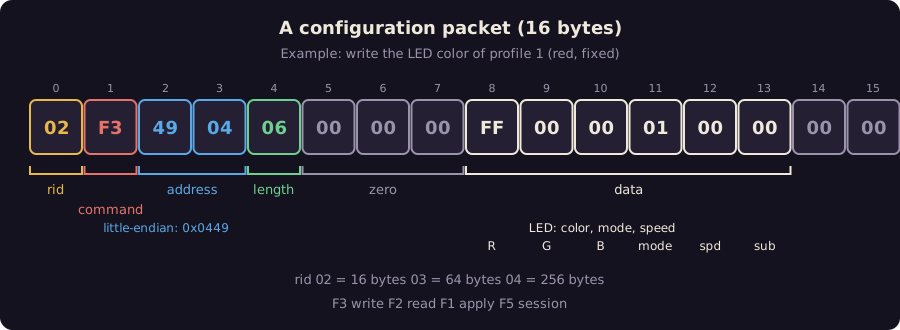
- byte 0,
rid: the report size.02is 16 bytes,03is 64 and04is 256. I pick the smallest one that fits the data - byte 1, command:
F3writes,F2reads,F1applies an area andF5opens or closes the session - bytes 2 and 3: the memory address, little-endian. The LED of profile 1 is at
0x0449, so it goes as49 04 - byte 4: how many data bytes follow
- bytes 5 to 7: zero
- from byte 8: the data. In the example,
FF 00 00is red,01is the fixed mode and the last two are speed and an auxiliary field
The example packet, 02 F3 49 04 06 00 00 00 FF 00 00 01 00 00 00 00, is what Salamandra builds to paint profile 1 red. A test checks these 16 bytes.
A write, step by step
The mouse does not apply what you write right away. The software opens a session, writes, tells the mouse to apply each area and closes the session:
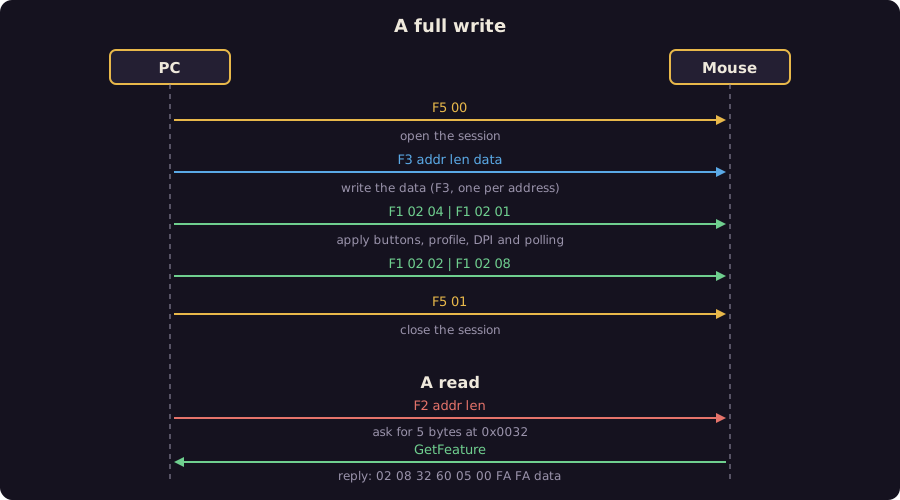
F5 00opens the session;- several
F3, one per address; F1 02 <area>for each area:04buttons,01profile,02DPI and08polling;F5 01closes the session.
A read is different. F2 asks for the bytes, and the answer comes in a GetFeature on the same report: rid 08 addr_lo 60 len 00 FA FA and then the data.
A trap that only showed up on the physical mouse: when you write the active profile, the buttons of the new profile apply right away, but the LED only changes on the next session. Switching profile and restoring a backup run one extra session because of this.
Where everything lives in memory
The mouse has 5 profiles, each with an address base. DPI and buttons are relative to it. Polling and LED have their own tables, indexed by profile. Macros come last:
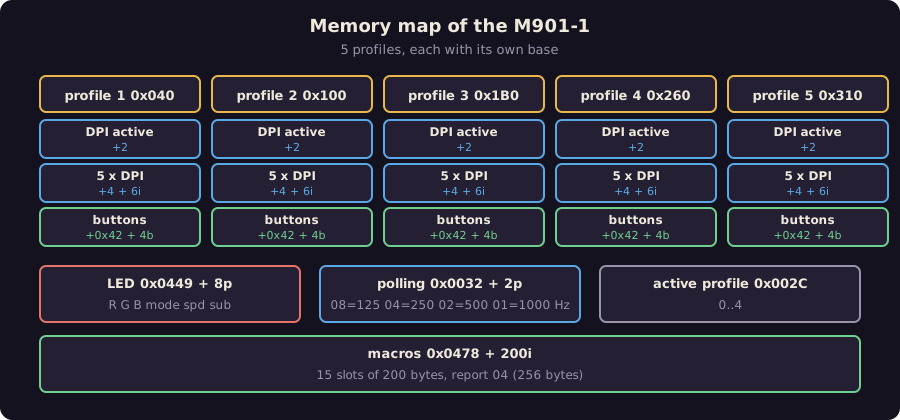
Some details I kept as data in the models:
- DPI: the byte holds the index (
DPI / 100) minus 1 up to0x79, and minus0x3Dwith a flag set above that. That is how 100 to 24000 DPI fits - polling:
08is 125 Hz,04is 250,02is 500 and01is 1000 - button: 4 bytes per button.
81,82and83are left, right and middle. A key becomes90 00 <HID usage> 00 - macro: up to 63 events of 3 bytes, written in one 256-byte report. Key down is
84 <usage> 00, key up is04 <usage> 00, and the delay is06plus 16 bits in units of 10 ms
The mouse talks back
The way back exists: when you press the DPI or profile button, the mouse sends an input report. 08 01 <profile> says the profile changed, 08 02 <level> that the DPI level changed and 08 06 <code> that the polling changed. Salamandra listens to these reports and passes them on to the app screen.
Built-in shortcut buttons (copy, paste, Alt+Tab) work another way: the mouse only sends a code (01 FF <id>) and it is the software on the PC that runs the shortcut. That is why the app keeps running in the background, even with the window closed, to run these shortcuts.
Command line and MCP
The same library becomes a CLI, with no Tauri and no window:
salamandra show
salamandra dpi 1 1 1600
salamandra backup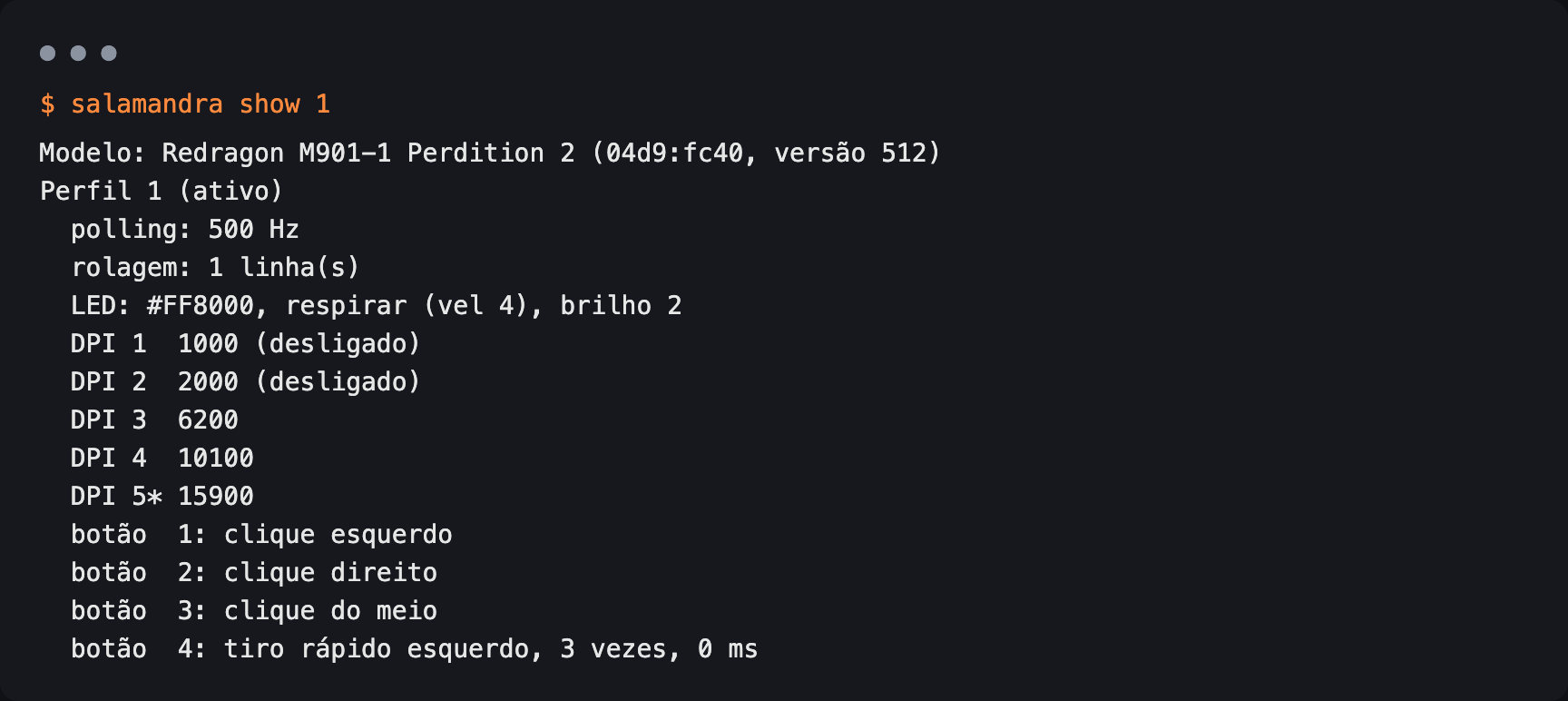
It also becomes an MCP server. Any MCP client can read the configuration and write LED, DPI and buttons. The tools that change the mouse warn when the model has never been tested.
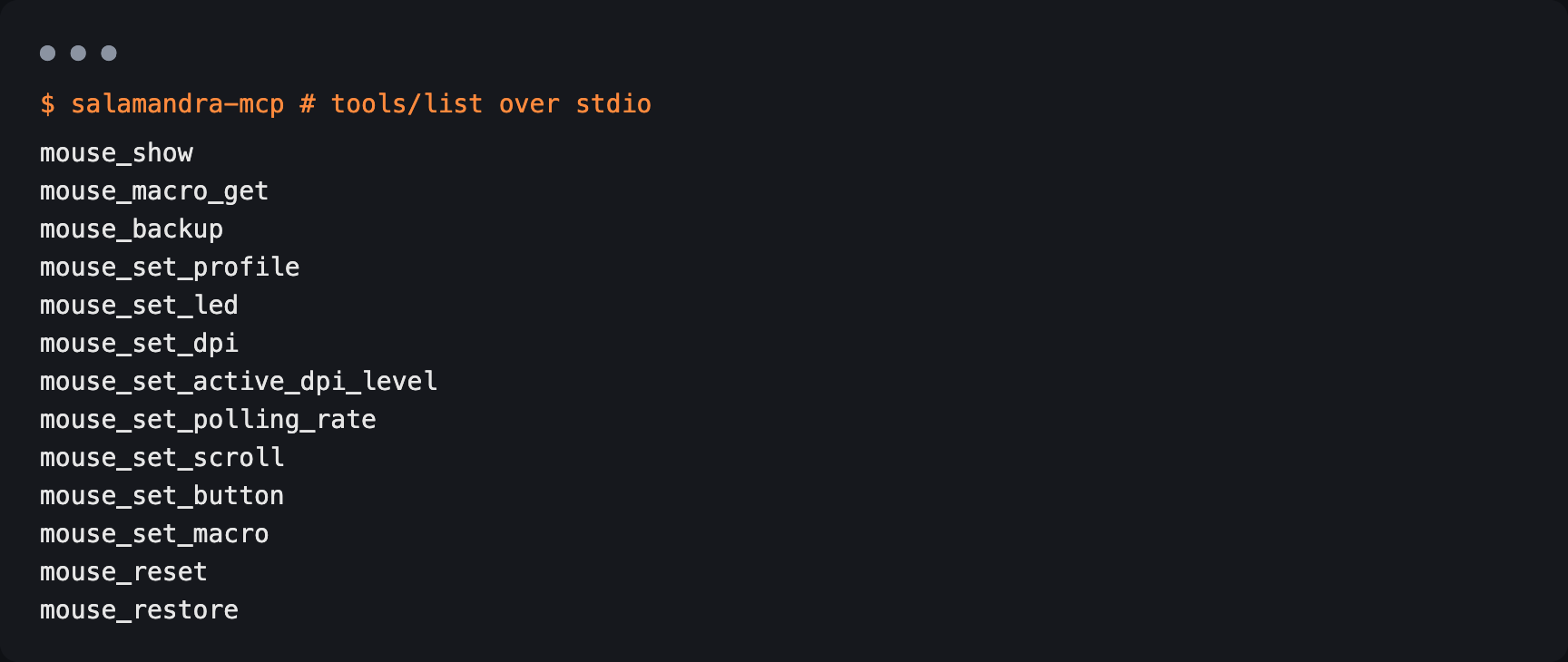
The CLI messages are still in Portuguese for now.
What runs today
| Mouse | Status |
|---|---|
| Redragon M901-1 Perdition 2 | tested on my mouse |
| Redragon M908 Impact | untested |
| Redragon M719 Invader | untested |
| Redragon M711 Cobra | untested |
The last three were mapped from the official software and public documentation, and were never checked on a physical mouse. The app shows a fixed warning and the CLI warns before every write. Salamandra writes anyway, so make a backup first.
There is a trap I found along the way: the same USB ID can cover models with different sensors, and only the device version tells them apart. show now prints that version.
How to help
I need people with a physical mouse:
- test the Impact, Invader or Cobra and tell me what happened (there is an issue template for that)
- send me the USB ID of other Redragon models
- own a Griffin M607, which is still blocked for lack of a mouse
Installers for the three systems are on the releases page. The version is a test one (pre-release).
Receba os artigos novos por e-mail
Um e-mail quando sair artigo novo. Sem spam, e dá para sair quando quiser.
Projetos citados
Ativo
Salamandra
Configurador aberto de mouses gamer para Windows, Linux e macOS, sem o software do fabricante.